
Introduction: Why Uitly Is Changing the Way We Share Links Online
In today’s hyper-connected digital world, the way you share a link says a lot about your brand. A long, messy URL filled with random characters is not just unattractive — it kills trust. And if you are a business owner, content creator, marketer, or freelancer, that lost trust can mean lost revenue.
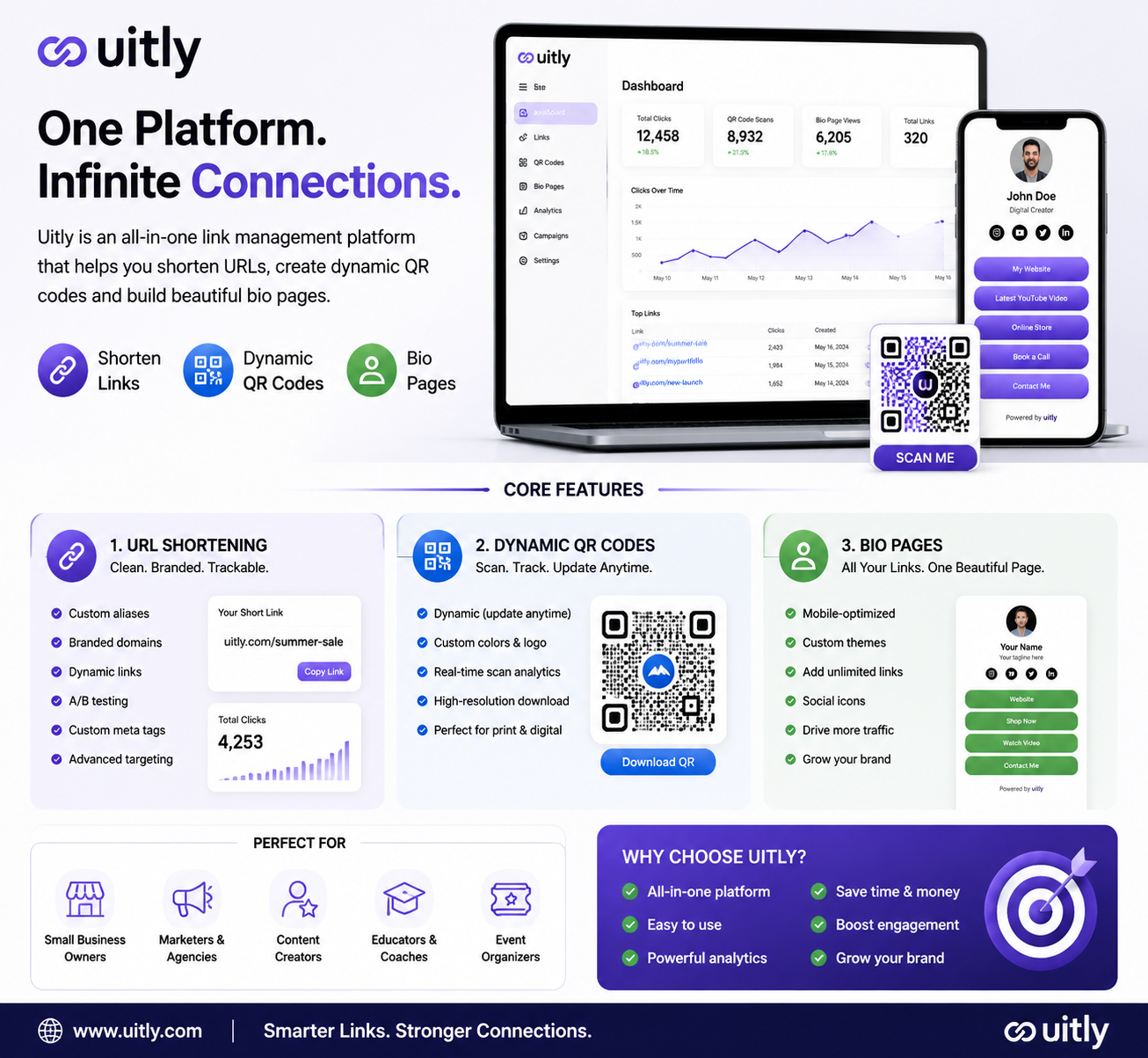
Enter Uitly — a smart, all-in-one digital platform that transforms the way you manage, share, and track your online links. More than just a URL shortener, Uitly bundles three powerful tools into a single, easy-to-use dashboard: link shortening, dynamic QR codes, and beautiful bio pages.
Whether you want to run a marketing campaign, build a professional online presence, or simply share a link in a cleaner way, Uitly has a solution for you. In this comprehensive guide, we will walk you through everything you need to know about Uitly — what it is, how it works, its key features, who should use it, and whether it is worth your time and money.
What Is Uitly?
Uitly is a web-based link management and digital branding platform that allows users to:
- Shorten long URLs into clean, branded, and trackable links
- Create dynamic QR codes with custom branding and real-time analytics
- Build bio pages — mobile-optimized landing pages that host all your important links in one place
At its core, Uitly is designed to solve a real problem: the chaos of managing multiple links across multiple platforms. Instead of jumping between five different tools, Uitly brings everything under one roof with a clean and intuitive interface that anyone — technical or not — can use within minutes.
The platform is trusted by small business owners, social media influencers, digital marketers, developers, educators, and event organizers across the globe. Its mission is simple: make your digital presence smarter, faster, and more professional.
The Problem Uitly Solves
Before diving into Uitly’s features, it helps to understand why a tool like this is needed in the first place.
Here is the reality of digital link sharing today:
- Long URLs look unprofessional and are difficult to remember
- Social media platforms like Instagram only allow one clickable link in the bio
- Marketers need to track click data to measure campaign success
- Physical marketing materials like business cards and brochures need scannable QR codes
- Managing links across campaigns, platforms, and team members gets messy fast
Uitly addresses every one of these pain points. It is not just a convenience — for many businesses and creators, it is a competitive advantage.
Uitly’s Core Features — A Detailed Breakdown
1. URL Shortening — Clean, Branded, Trackable Links
The most fundamental feature of Uitly is its URL shortener. Paste any long link and Uitly instantly generates a short, clean version that is easy to share anywhere.
But Uitly goes well beyond basic shortening. Here is what makes its URL shortener stand out:
Custom Alias:
Instead of a random string of characters, you can choose your own custom slug. For example, uitly.com/summer-sale or uitly.com/myportfolio. This makes your links memorable and on-brand.
Branded Domains:
For businesses that want full brand consistency, Uitly allows you to connect your own domain. So instead of uitly.com/link, your short link becomes yourbrand.com/link. This builds trust and reinforces your brand every time someone sees your link.
Dynamic Links:
This is one of Uitly’s most powerful features. Dynamic links allow you to change the destination URL at any time — even after the link has been shared or printed. Imagine you printed 5,000 brochures with a QR code linking to your product page. If that page URL changes, a dynamic link means you simply update the destination in your Uitly dashboard, and the existing link and QR code still work perfectly.
A/B Testing:
Uitly lets you test two different destination URLs against each other and see which one drives better results. This is essential for marketers who want to optimize conversion rates.
Custom Meta Tags:
Control how your link appears when shared on social media platforms. Set your own title, description, and image for each link — making sure every share looks intentional and professional.
Advanced Targeting:
Redirect different users to different pages based on their location, device type, or browser. A user on mobile can go to your app download page, while a desktop user goes to your website.
2. Dynamic QR Codes — Bridge the Gap Between Online and Offline
QR codes have made a massive comeback in recent years, and they are now a standard part of modern marketing. Uitly’s QR code generator takes this essential tool to the next level.
Dynamic vs. Static QR Codes:
Static QR codes are fixed forever — if the destination URL changes, you need to reprint the code. Uitly’s dynamic QR codes allow you to update the destination URL any time without changing the physical QR code itself. Print once, update forever.
Custom Branding:
Uitly’s QR codes are not just black-and-white squares. You can customize them with your brand colors, add your logo in the center, choose custom frames, and match the design to your visual identity. A branded QR code looks professional and builds trust with your audience.
Real-Time Tracking:
Every scan of your QR code is tracked. You can see how many people scanned it, when they scanned it, where they were located, and what device they used. This data is invaluable for measuring the success of offline marketing campaigns.
High-Resolution Download:
Download your QR code in high resolution, ready for print. Whether it is a billboard, a product label, a business card, or a restaurant menu — Uitly’s QR codes print perfectly at any size.
Use Cases for Uitly QR Codes:
- Restaurant menus on tables
- Business cards linking to your portfolio or contact page
- Product packaging linking to tutorial videos or warranty registration
- Event invitations with QR codes for RSVP or venue maps
- Retail displays linking to product reviews or special offers
- Classroom materials linking to study resources
3. Bio Pages — Your All-in-One Social Media Landing Page
If you are active on Instagram, TikTok, YouTube, or Twitter, you already know the frustration: you can only put one link in your bio. Uitly’s Bio Pages turn that one link into a full mini-website.
A Bio Page is a mobile-optimized landing page that you customize with your name, photo, branding, and as many links as you want. Share the single Bio Page URL in all your social media bios, and your followers can access everything from one place.
What you can include on a Uitly Bio Page:
- Profile photo and bio text
- Links to your website, YouTube channel, online store, podcast
- Social media profile buttons (Instagram, Twitter, LinkedIn, etc.)
- WhatsApp and phone contact buttons
- Special offer or announcement banners
- Embedded videos or featured content
Customization Options: Choose background colors, fonts, button styles, and layouts to match your personal or brand aesthetic. Your Bio Page becomes an extension of your identity — not a generic link-in-bio page.
Analytics on Every Button:
Uitly tracks clicks on each individual button on your Bio Page. So you know exactly which links your audience is most interested in. This helps you prioritize content and understand your followers better.
4. Smart Deep Linking — Better User Experience, Every Time
Deep linking is a feature that directs users to a specific page within an app, rather than a generic homepage or the App Store.
Here is a real-world example: You share a Spotify song link with your followers. Without deep linking, clicking that link might take them to the Spotify website or the App Store. With Uitly’s Smart Deep Linking, the link opens the song directly inside the Spotify app (if installed) — or redirects to the App Store if the app is not yet installed.
This creates a seamless user experience that reduces friction and increases engagement. For app developers and mobile marketers, this feature alone makes Uitly worth using.
Supported use cases:
- Music and podcast platforms
- E-commerce apps
- Video streaming services
- Food delivery apps
- Travel and booking platforms
5. Analytics and Insights — Data That Drives Decisions
Every link you create on Uitly comes with a detailed analytics dashboard. This is where Uitly truly separates itself from basic free URL shorteners.
What Uitly Analytics tracks:
- Total Clicks: The overall number of times your link was clicked
- Unique Clicks: How many individual users clicked your link
- Click Over Time: A timeline graph showing when clicks occurred
- Geographic Data: Which countries, regions, and cities your clicks came from
- Device Breakdown: Mobile, tablet, or desktop
- Browser Data: Chrome, Safari, Firefox, and others
- Referrer Data: Where traffic is coming from — Facebook, Google, WhatsApp, direct
Armed with this data, you can make smarter decisions about your marketing. You will know which platforms drive the most traffic, what times your audience is most active, and which campaigns are worth repeating.
6. Campaigns and Link Organization
Managing dozens or hundreds of links across multiple campaigns can get overwhelming. Uitly solves this with Campaigns — a way to group related links, QR codes, and bio pages together.
You can view aggregated analytics for an entire campaign, compare the performance of different assets, and keep your workspace organized even as your operations scale.
This feature is particularly useful for digital marketing agencies managing multiple client accounts, or businesses running several simultaneous promotions.
7. Team Collaboration — Work Together, Smarter
Uitly is not just for solo users. It is built to support teams with collaborative features:
- Add Team Members: Invite colleagues to your Uitly workspace in seconds
- Role-Based Permissions: Control what each team member can view, edit, or manage
- Multiple Workspaces: Organize different clients or projects in separate workspaces
- Shared Campaigns: Work together on campaigns without stepping on each other’s toes
For agencies, marketing teams, and growing businesses, these collaboration tools make Uitly a practical team solution — not just a personal productivity tool.
8. Third-Party Integrations — Connect Your Favorite Tools
Uitly connects with the tools you already use:
- Facebook Pixel: Add your pixel to track conversions and run retargeting ads
- Google Tag Manager: Deploy tracking codes across your links
- Zapier: Automate workflows between Uitly and hundreds of other apps
- Webhooks and Slack: Get instant notifications when your links are clicked
- Developer API: Build custom integrations and embed Uitly’s capabilities into your own applications
These integrations make Uitly a part of a larger marketing ecosystem, rather than a standalone tool.
Who Should Use Uitly?
Uitly is designed to be accessible to a wide range of users. Here is a breakdown of who benefits most:
Small Business Owners:
Share product links on WhatsApp and social media. Create QR codes for your shop window, product packaging, or business cards. Track which promotions are driving the most traffic.
Social Media Creators and Influencers:
Use one Uitly Bio Page link across all your social profiles. Track which content your audience engages with most. Manage brand deal links professionally.
Digital Marketers:
Run and track link campaigns with detailed analytics. A/B test landing pages. Integrate with Facebook Pixel and Google Tag Manager. Manage multiple clients from one dashboard.
Freelancers:
Build a professional Bio Page as your digital business card. Send clean, branded links to clients. Present your work in a polished and organized way.
Educators and Trainers:
Share study material links easily with students. Create QR codes for printed handouts that link to online resources. Update destination URLs anytime without reprinting.
Event Organizers:
Create QR codes for event tickets, registration forms, venue maps, and schedules. Update information as it changes without creating new QR codes.
Developers:
Use Uitly’s API to integrate link management and QR generation into custom applications.
Uitly vs. Competitors — How Does It Stack Up?
| Feature | Uitly | Bitly | TinyURL | Linktree |
|---|---|---|---|---|
| Custom Alias | ✅ | ✅ (Paid) | ❌ | N/A |
| Branded Domains | ✅ | ✅ (Paid) | ❌ | ✅ (Paid) |
| Dynamic QR Codes | ✅ | ✅ (Paid) | ❌ | ❌ |
| Bio Pages | ✅ | ❌ | ❌ | ✅ |
| Deep Linking | ✅ | ✅ | ❌ | ❌ |
| Team Collaboration | ✅ | ✅ (Paid) | ❌ | ✅ (Paid) |
| Advanced Analytics | ✅ | ✅ (Paid) | Limited | ✅ (Paid) |
| A/B Testing | ✅ | ✅ (Paid) | ❌ | ❌ |
| Developer API | ✅ | ✅ | ❌ | Limited |
| Free Plan | ✅ | ✅ (Limited) | ✅ | ✅ (Limited) |
Uitly stands out by combining the core strengths of multiple specialized tools — URL shortening (like Bitly), bio pages (like Linktree), and QR generation — into a single unified platform. For users who need all three capabilities, Uitly is significantly more cost-effective than subscribing to separate services.
Uitly Pricing Plans
Uitly offers a flexible pricing structure designed to accommodate both casual users and professional teams.
Free Plan
The free plan is an excellent starting point for individuals who want to explore the platform. It includes basic URL shortening, QR code generation, and bio page creation with standard features. Ideal for personal use and testing the waters.
Paid Plan
The paid plan unlocks the full power of Uitly and is designed for serious creators, businesses, and marketing teams. Key additions include:
- Custom branded domains
- Unlimited links, QR codes, and bio pages
- Advanced analytics with detailed reporting
- A/B testing
- Team collaboration and role management
- API access
- Facebook Pixel and Google Tag Manager integration
- Priority customer support
For businesses and creators who rely on link performance data to drive decisions, the paid plan pays for itself quickly.
How to Get Started with Uitly — Step by Step
Getting started with Uitly takes less than five minutes:
Step 1: Create Your Account
Visit uitly.com and sign up using your email address or Google account. The registration process is quick and straightforward.
Step 2: Shorten Your First Link
Paste your long URL into the dashboard. Uitly will instantly generate a short link. Optionally, set a custom alias to personalize it.
Step 3: Customize and Download Your QR Code
Your short link automatically generates a QR code. Customize it with your brand colors and logo, then download it in high resolution for print or digital use.
Step 4: Build Your Bio Page
Head to the Bio Pages section and create your personalized landing page. Add your photo, bio, and all your important links. Style it to match your brand.
Step 5: Connect Your Integrations
If you use Facebook Pixel, Google Tag Manager, or Zapier, connect them in the settings panel for enhanced tracking and automation.
Step 6: Monitor Your Analytics
As your links start receiving clicks, your dashboard will populate with data. Review your analytics regularly to understand your audience and optimize your strategy.
Uitly’s Pros and Cons — An Honest Assessment
Pros
- All-in-one platform: URL shortening, QR codes, and bio pages in one place
- Clean, intuitive interface with a short learning curve
- Powerful analytics that inform smarter marketing decisions
- Dynamic QR codes that can be updated without reprinting
- Smart deep linking for better mobile user experience
- Team collaboration tools suitable for agencies and growing businesses
- Branded domains and custom aliases for professional presentation
- Reliable security with SSL encryption
Cons
- Some advanced features require the paid plan
- Setting up a custom domain may require some technical knowledge for first-time users
- The free plan has limits that may feel restrictive for heavy users
- As a relatively newer platform, it may have fewer third-party integrations than more established competitors
Overall, the pros significantly outweigh the cons — especially for users who need a comprehensive link management solution without paying for multiple separate tools.
Is Uitly Safe and Legit?
Yes, Uitly is a legitimate and secure platform. It uses SSL encryption to protect user data and link information. The platform does not sell user data and maintains clear terms of service.
Uitly is trusted by thousands of businesses, content creators, and marketing professionals worldwide. Its integrations with reputable platforms like Google and Facebook further confirm its credibility.
As with any link-forwarding service, it is important to exercise caution when clicking short links from unknown sources. Uitly provides tools for users to report suspicious links, and the platform actively moderates content that violates its terms of service.
Real-World Use Cases — Uitly in Action
Case Study 1: E-Commerce Brand
An online fashion brand used Uitly to create branded short links for their seasonal sale campaigns. By tracking click data from different platforms (Instagram, WhatsApp, email newsletter), they identified that WhatsApp drove 60% of their sales traffic — allowing them to focus their marketing efforts there.
Case Study 2: Content Creator
A lifestyle influencer with 200,000 Instagram followers replaced a static Linktree page with a Uitly Bio Page. Using Uitly’s per-button analytics, she discovered that her “Shop My Looks” button drove 3x more clicks than her YouTube link — prompting her to negotiate higher fees for sponsored shoppable content.
Case Study 3: Restaurant Chain
A multi-location restaurant printed dynamic QR codes on all their table tents. When they redesigned their menu, they simply updated the destination URL in Uitly — no reprinting required. They estimated saving over $2,000 in printing costs in one year.
Case Study 4: Marketing Agency
A digital marketing agency used Uitly’s team workspaces to manage link campaigns for 15 different clients from a single account. Each client had their own workspace, and the agency used campaign grouping to deliver clean monthly analytics reports.
The Future of Uitly and Link Management
The demand for smart, streamlined digital tools is growing rapidly. As more businesses move online and more creators build digital audiences, platforms like Uitly become essential infrastructure — not optional extras.
Several trends are working in Uitly’s favor:
- QR code adoption is accelerating across retail, hospitality, healthcare, and events
- Link analytics are becoming a standard part of digital marketing measurement
- Bio pages are now expected by professional creators and businesses alike
- Mobile-first browsing makes deep linking increasingly important for user experience
- Small business digitization is creating millions of new users who need simple but powerful link management tools
Uitly is well-positioned to grow alongside these trends, and continued investment in the platform suggests its feature set will only expand.
Frequently Asked Questions About Uitly
Q: Is Uitly completely free?
A: Uitly offers a free plan with core features. Advanced features like custom domains, unlimited links, and detailed analytics are available on the paid plan.
Q: Can I change the destination of a Uitly QR code after printing?
A: Yes. Dynamic QR codes allow you to update the destination URL at any time. The physical QR code image stays the same — only the destination changes.
Q: Does Uitly work on mobile devices?
A: Yes. Both the Uitly dashboard and the bio pages it creates are fully optimized for mobile, tablet, and desktop devices.
Q: Is Uitly suitable for teams?
A: Absolutely. Uitly includes team collaboration features with role-based permissions and multiple workspaces — ideal for agencies and growing businesses.
Q: Can I use my own domain name with Uitly?
A: Yes. The paid plan allows you to connect your own branded domain for short links, giving your URLs a professional, on-brand appearance.
Q: How does Uitly compare to Bitly?
A: Uitly offers more features in its free plan and adds bio pages and deep linking that Bitly does not offer. For users who need all three core features — URL shortening, QR codes, and bio pages — Uitly is generally more cost-effective.
Q: Is Uitly safe to use?
A: Yes. Uitly uses SSL encryption and does not sell user data. It is trusted by businesses and creators around the world.
Conclusion: Should You Use Uitly?
If you are serious about your online presence — whether you are a business, a creator, a marketer, or a freelancer — Uitly is worth using. It replaces multiple tools with one clean, powerful platform that handles URL shortening, QR code generation, and bio pages with equal competence.
The free plan is a risk-free way to get started, and the paid plan unlocks capabilities that can genuinely transform how you manage and measure your digital marketing efforts.
In a digital world where first impressions matter and attention spans are short, Uitly gives you the tools to present yourself professionally, track your results precisely, and act on real data — not guesswork.
Ready to get started? Visit uitly.com today and create your first smart link in under a minute.
This article was published by urbanunion.news. For more digital marketing guides, tech reviews, and business tools coverage, stay connected with us.

6 Comments
The breakdown of dynamic QR codes bridging the offline and online gap is particularly insightful for anyone managing seasonal marketing campaigns. I also appreciate how the guide highlights team collaboration features, which often get overlooked when discussing link management tools. It seems like a robust solution for handling complex deep linking needs while keeping analytics accessible to non-technical team members.
Great breakdown of Uitly’s features. I’ve been looking for a single tool to keep all my link workflows in one place instead of juggling Bitly and a QR generator. The deep linking section was especially useful for our team’s campaign tracking. On a related note, I often deal with QuickTime recordings from interviews and have to convert them to MP3 before publishing, so a reliable MOV to MP3 converter in my browser has been a lifesaver.
Uitly’s bio page concept is exactly what I was looking for to share my music projects. I use a music video AI generator to create beat-synced videos, and being able to organize all my track links, socials, and project pages in one clean bio page would make sharing new releases so much easier. The dynamic QR codes sound especially handy for promoting tracks at live events and in printed materials.
Really useful breakdown of Uitly. I especially liked how clearly the QR code customization and the Bio Page sections were explained. It helped me decide which plan fits a small creative team like mine. The comparison table with Bitly and Linktree also saved me a lot of guesswork.
I have been using Uitly for a couple of months and the dynamic QR codes are honestly my favorite part, especially for sharing slide decks and event posters that keep getting updated. The team workspace view also makes it much easier to keep branding consistent across our marketing channels. Solid write-up, it captures the feature set pretty accurately for anyone evaluating link management tools.
This guide clarified a lot for me — especially how dynamic QR codes fit into campaigns that change often. I’ve been using Uitly mostly for short links, so the Bio Page angle is new and I appreciate the honest pricing comparison. For the visuals on those pages I usually need quick touch-ups, and image editor ai has been handy for cleaning up cover photos and branded graphics without opening Photoshop.